Stop editing the same document for every client.
Upload a proposal or contract you already send. Templet turns it into a reusable template with fill-in fields — so the next one takes minutes, not another hour of editing.
Free forever plan · No credit card required
Set it up once. Then it’s a form.
Three steps, and only the first one takes any real time. After that, sending a document is filling in the handful of things that actually change.
Upload what you already send
Drop in a PDF you have sent before — a proposal, a contract, an invoice. It comes back as an editable document, not a picture of one.
Mark what changes
The client’s name, the dates, the fee — turn them into fill-in fields once. AI can find them for you and you just confirm.
Fill the form, send the document
Every document after that is a short form. Type the few things that differ, generate the PDF, email it — a couple of minutes, start to finish.
Your old PDF, rebuilt as something you can reuse.
The slow part of switching tools is rebuilding what you already have. So don’t. Upload the PDF and AI reconstructs it as an editable template — headings, lists, and tables in place — then marks the parts that change from client to client as fill-in fields, for you to confirm.
A document you would have spent an evening recreating is ready in about a minute.
Plain-text import is on every plan, Free included · AI import and field detection are on paid plans
Statement of Work
This agreement is made between client_name and Studio North, beginning start_date.
The total fee is project_fee, invoiced in instalments and payable within 15 days.
Rebuilt, not retyped
AI reads the PDF and reconstructs it as an editable document, keeping the headings, lists, and tables where they were.
Fields found for you
It marks the parts that change from client to client as fill-in fields. You confirm the suggestions instead of hunting through the page.
Built to take the repetition out.
Everything here exists to remove a step you would otherwise do by hand, every time you send a document.
The parts that change, and nothing else.
A placeholder marks anything that differs per client — a name, a date, a fee, a table row. Everything else stays fixed, so there is no scrolling through a document looking for the four things you forgot to update.
Fill in the fields
Client name
Foxglove Bakery
Start date
3 September 2026
Project fee
£4,200
Instalments
Two — 50% up front
The rest of the document writes itself.
Know where every document stands.
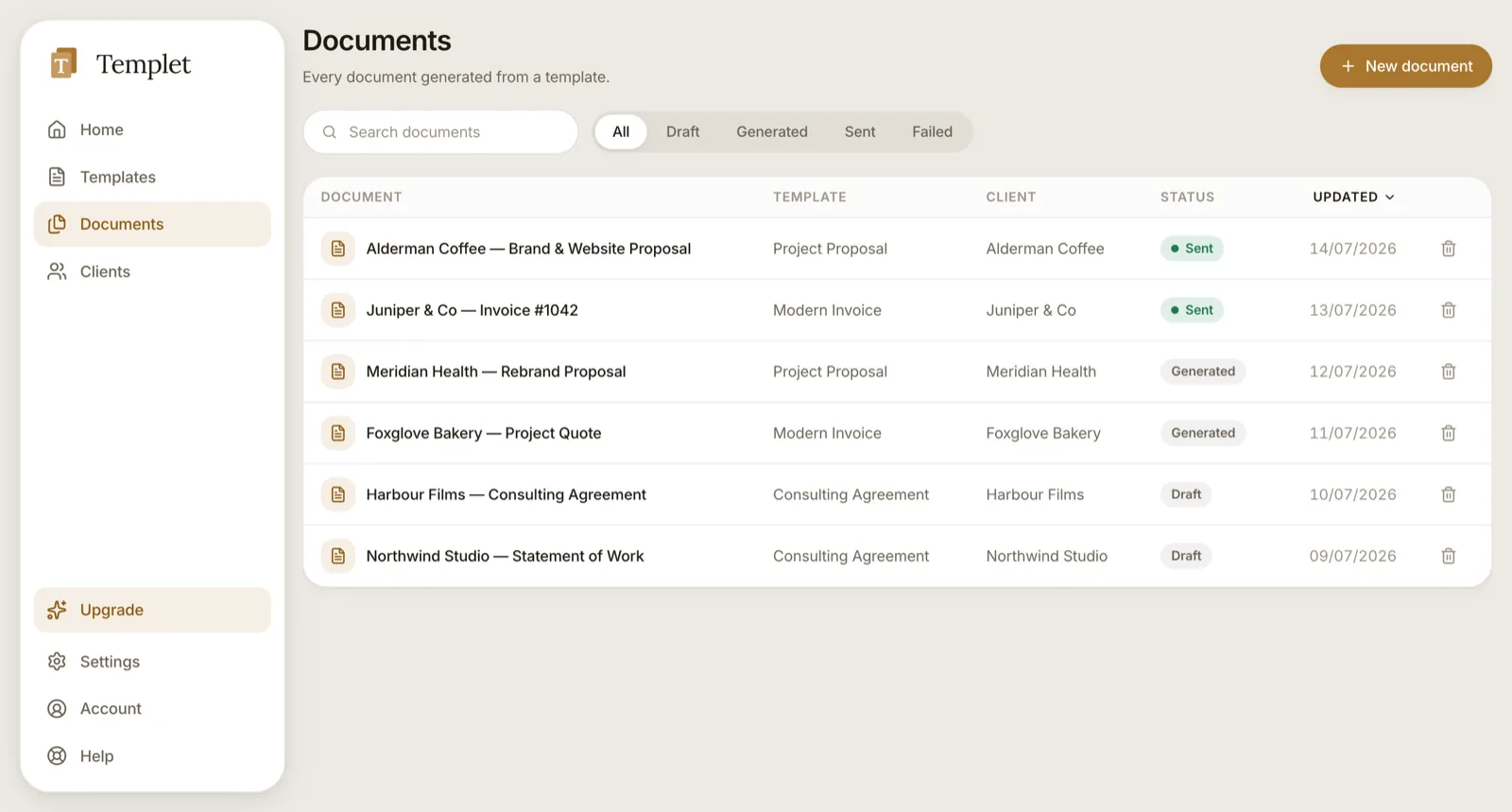
Draft, generated, sent — every document carries its status, so you follow up at the right moment and stop losing work to “I forgot to send it.”
Fill in, generate, send
The fields become a form. Type the few things that change, get the PDF, email it to the client — without leaving Templet or opening a design tool.
Every client in one place
Open any client and see everything you’ve ever sent them. No more digging through email attachments to find what you quoted last time.
Shared with your team
Templates live in a workspace, so a new teammate sends the right document on day one instead of asking someone to forward the last good version.
Say what you want changed. Skip the editing.
An assistant sits beside your document. Ask in your own words — “make the intro shorter”, “add a cancellation clause”, “turn the client details into fill-in fields” — and it makes the edit while you watch. The work you would have done by hand, described in a sentence instead.
Included on every paid plan · Start free and upgrade whenever
Shorten the intro and add payment terms like the ones in my Service Agreement
Tightened the opening to two sentences and added a Payment terms section, reusing the 15-day wording from your Service Agreement. It refers to Client name and Fee.
- · Rewrote “Thank you for the opportunity…”
- · Added after “Scope of work”
Ask for a change…
It shows its work
Every change it makes is listed under the reply, in plain words. Nothing is edited quietly behind your back.
One undo takes it all back
A whole turn lands as a single edit, so if you don’t like it, one Cmd+Z and the document is exactly as it was.
It knows your other templates
Ask for the payment terms from your contract, or the tone of your best proposal, and it goes and reads them.
Or start from nothing at all
Describe the document you need — “a web design proposal with three pricing tiers” — and AI writes the whole template.
The difference is what you do the second time.
Word and Canva are fine for one document. The cost shows up on the fiftieth — when you are still editing a copy of a copy, and one stale number is all it takes to send a client the wrong price.
The old way
- Open the last one, save a copy, start editing
- Read the whole thing hunting for what to change
- Miss one — send a contract with the wrong fee in it
- Twenty minutes a document, every document
With Templet
- Open the template, fill in four fields
- Only what changes is editable — nothing to hunt for
- Nothing missed, because nothing was retyped
- A couple of minutes, and it is out the door
Simple pricing that grows with you.
Start free — no credit card. Move up only when you need more documents, custom branding, or teammates.
Free
For trying Templet on a document or two.
- 5 documents per month
- Ready-made starter templates
- One-click PDF export
- Documents carry a Templet watermark
Solo
For the freelancer running the whole show.
- Describe a document — AI writes the template
- Turn any PDF into an editable template
- About 35 AI templates a month
- Your logo, fonts and colours — no watermark
- 100 documents a month, unlimited clients
Team
For a small team that needs one consistent brand.
- Everything in Solo
- Unlimited documents and PDF imports
- About 100 AI templates a month
- Up to 10 teammates, with roles
- One shared, on-brand template library
Business
For a growing business managing clients at scale.
- Everything in Team
- About 275 AI templates a month
- Unlimited teammates
- Priority support
Start on the Free plan — no credit card required. Upgrade, downgrade, or cancel anytime.
Questions, answered.
Can I turn a document I already have into a template?
Yes — that is the fastest way to start, and you do not have to rebuild anything. Upload a PDF you already send, like an old proposal or contract, and Templet turns it into an editable template. On the paid plans, AI reconstructs it properly — keeping the headings, lists, and tables where they were — and then marks the parts that change from client to client as fill-in fields for you to confirm. Plain-text import is on every plan, Free included.
Do I have to find all the fill-in fields myself?
No. AI reads the document and suggests them — the client’s name, dates, amounts, the line items in a table — and you review the list before anything is applied, so you stay in control of what becomes a field. You can also mark or rename any field by hand at any point. Field detection is on the paid plans.
How much time does this actually save?
The first document takes a few minutes to set up: import it, confirm the fields. Every one after that is filling in the handful of things that differ — usually a name, a date, and a couple of numbers — then one click to generate the PDF and send it. The saving is not in making one document; it is in never editing a copy of a copy again, and in not sending a contract with last client’s fee still in it.
Is Templet really free? What’s the catch?
Yes — the Free plan is free forever, with no time limit and no credit card. You can generate up to 5 documents a month and keep them all; they carry a small Templet watermark. Upgrade when you want AI to write your templates, your own branding instead of the watermark, or teammates.
Do I need a credit card to start?
No. You can create your account, build a template, and generate real PDFs without entering any payment details.
What kind of documents can I create?
Any client-facing document: proposals, quotes, estimates, contracts, statements of work, and invoices. You build a reusable template once, then generate a polished PDF from it whenever you need one.
What does the AI actually do?
Two things. It can write a whole template from a sentence describing what you need, and it can edit the template you have open — an assistant sits beside the document, you ask for changes in plain language, and it makes them. It lists every change it makes, it can borrow sections from your other templates, and a single undo reverts a whole turn. AI is included on every paid plan.
Is my work used to train AI models?
No. Your templates and documents are never used to train anyone’s AI model — not ours, not our provider’s. Content only leaves Templet at the moment you start an AI action: you ask for a template, upload a PDF, or send the assistant a message. Nothing is analysed in the background, and if you never touch an AI feature, nothing is ever sent.
What happens if I use up my AI allowance?
The AI features pause until the allowance resets at the start of your next monthly period — and that is all that pauses. Your templates, documents, PDFs, and sending keep working exactly as before. You can also upgrade for a larger allowance at any time.
How many AI imports do I get?
Five a month on Solo, and unlimited on Team and Business. Plain-text import has no limit on any plan, including Free — it extracts the text without reconstructing the layout, so you tidy it up yourself rather than paying for AI to do it.
Can I use my own branding?
Yes. Set your logo, fonts, and colours once, and every document you generate comes out on-brand automatically — no reformatting, no design skills required. (Custom branding is available on paid plans.)
Can I email documents to my client from Templet?
Yes. Generate the PDF, then send it straight to your client with the file attached — the document is marked Sent so you can see what has gone out, and replies come back to your own inbox, not ours. Sending is on every plan, including Free, with a daily limit that rises with your plan.
How is Templet different from Word, Google Docs, or Canva?
Those tools make one nice document at a time. Templet makes every document nice — automatically. You design the template once, generate consistent PDFs in a click, track each one from draft to sent, and keep everything organised by client.
Can I keep my documents if I cancel? Am I locked in?
Your documents are yours. Download any PDF at any time, and cancel in a couple of clicks — there are no long-term contracts. Downgrading keeps your data; nothing is deleted.
Can my team work together in Templet?
Yes. On the Team and Business plans you share a workspace, so everyone works from the same templates with the same branding. You can invite teammates as admins, editors, or view-only members.
What happens when I reach the Free plan’s limit?
You’ll see a gentle prompt to upgrade — nothing is deleted and you never lose access to what you’ve already made. Upgrade or downgrade any time.
Where is my data stored?
Your account, templates, documents, and client details are stored in the European Union, on servers in Frankfurt, Germany. Some processing happens in the United States — notably the server that renders your PDFs and sends your documents. Our Privacy Policy sets out every provider we use and what each one does.
Real help from real people.
Browse guides and answers in the help center, or open a ticket and hear back from us — usually within one business day. No bots, no runaround.
Build your first template in the next ten minutes.
Start free, keep everything you make, and send your next document looking like the studio you’re becoming.
Start for freeFree forever plan · No credit card required